Every texture pack we create starts life as a single photograph. This post walks through how that photo becomes a full set of game-ready PBR maps — and how an AI-driven pipeline does the heavy lifting while keeping every result under human review. The demo material today: a medieval English castle wall.
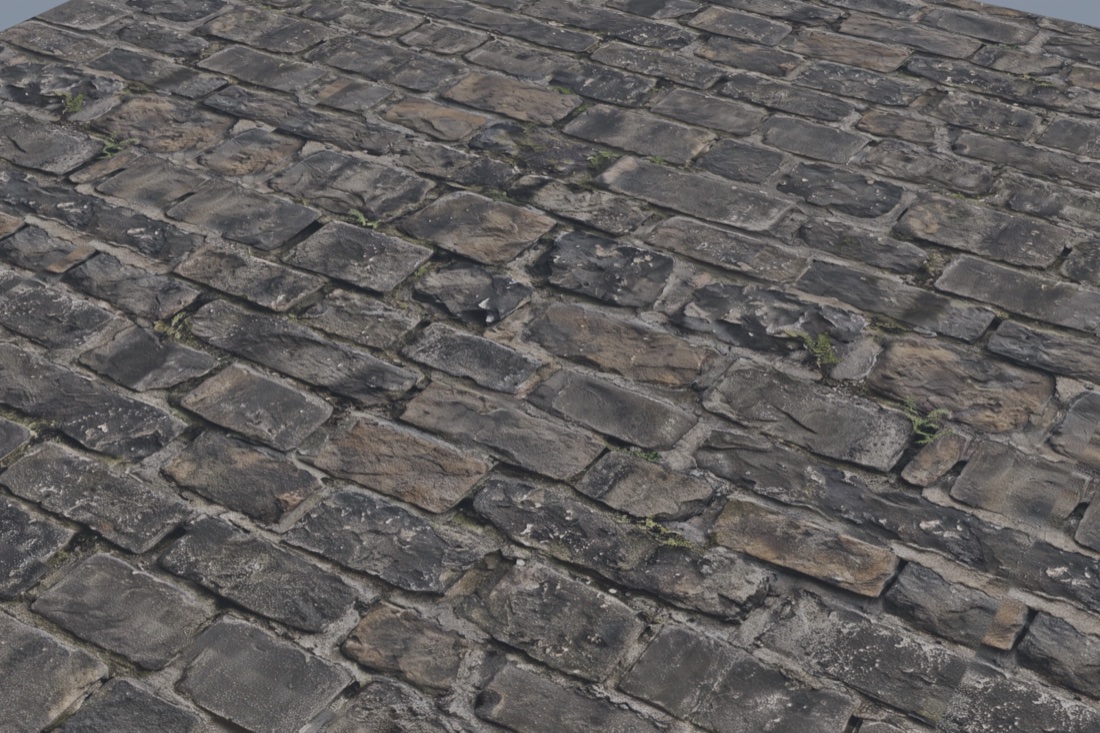 FIG 01 — THE FULL MATERIAL UNDER LIGHT: ALL SIX MAPS WIRED INTO ONE PRINCIPLED SHADER. RECIPE: NORMAL 2.0 · ROUGHNESS 0.30–0.80 · DE-LIGHT 0.70.
One photo in, six maps out
A base-color photo of a castle wall tells you what the surface looks like. That's one of six things a game engine actually needs. Our pipeline takes that single photo and derives the full standard set:
- Base Color — the clean, shadow-free color of the surface
- Normal — the fine surface detail (mortar lines, chisel marks, wear) that pops under game lighting
- Roughness — where the surface is polished and where it's dull
- Metallic — which parts of the surface conduct
- Height — real displacement depth for close-up work
- AO — baked ambient occlusion that grounds every crevice
The engine does the rest. The same six files drop straight into Blender, Godot, Unity 6, and Unreal Engine — no per-engine rework.
The interesting part: it's all a recipe
Every material is described by a recipe — a small JSON file of numbers the pipeline uses to produce each map. A photo alone doesn't tell you whether the roughness should span 0.30 to 0.80; that's a material decision. Here's the actual recipe from the castle wall above, straight from the JSON:
- "white_balance"
- 0.0 — shot neutral, no WB shift applied
- "delight"
- radius 24 · strength 0.70 — strips baked-in light
- "tiling"
- "offset" · seam_band 24 (px @ 2K)
- "normal_strength"
- 2.0 — confident mortar relief
- "roughness"
- floor 0.30 · ceiling 0.80 — weathered range
- "metallic"
- constant 0.0 — stone is dielectric, black by design
- "size"
- 2048 — shipped resolution
The recipe is why results are repeatable. When we like how a stone floor reads in Unreal, we can rebuild it, retile it, or re-resolution it without starting from scratch. It's also what turns one good photo into a tunable material instead of a one-off.
The part nobody talks about: tiling seams
A texture that tiles is more useful than a texture that doesn't — but seamless tiling is where most photo-sourced maps fail. Wrap a photo at the edges and you get a visible seam line running across the floor of your game level.
The pipeline treats seams as a first-class problem: an explicit seam band — 24 pixels at 2K for this material — gets blended across the wrap edges, and a diagnostics pass measures the actual color discontinuity at the seam and flags it. 1% change is invisible; 5% is a bug. Every map shipped in a pack has been through that check, so when you tile a material across a level, there is nothing to hide.
Human in the loop, everywhere
"AI pipeline" doesn't mean "nobody looks at it." Every derived map gets a lit render — all maps wired into a physically-based material with real lighting — before it ships. If the roughness map reads as a smudge, or the normal is overcooked, it doesn't ship. The render at the top of this post is that review: what you see is a real render of the actual maps in the pack.
Small, boring checks matter too, like which normal convention a file uses (OpenGL vs DirectX) — get it wrong and your bricks look sunken instead of raised. The pipeline tags it, the docs state it, the engines get the right flavor.
Many of the materials created by the pipeline are also used in our own projects — so they get a second human-in-the-loop look as we build actual game assets with them in Blender and our game engines.
See it live: the turntable
Words and renders are one thing — a material is made to be seen in motion. Below is the castle wall material on a rotating cube, running the actual maps from the pack in your browser: base color, normal, roughness, metallic and ambient occlusion, all wired exactly like a game engine would. Drag it, zoom it, swing the light across it and watch the mortar lines catch and fall.
Why we package this instead of guarding it
We use this pipeline to build the materials behind our own game projects — and we sell the output as texture packs on Gumroad, ready for Blender, Godot, Unity 6, and Unreal. The pipeline stays behind the scenes; the packs are what you get: six standard maps, checked for seams, rendered previews to show exactly how they read under light, priced on Gumroad.
If you want to see it in products rather than words, our Anime VFX Spell Sheets demo page shows the same process discipline applied to 2D sprite/VFX work.
· · ·